
Team & Operations

Run the office from the same place you run admissions

Tasks tied to student files, counselling appointments with Google Meet, attendance with shifts, leave, and announcements everyone has to see.

Meetings
Google Meet · Jitsi
Tasks
Kanban · Templates
Attendance
Shifts · Leave
crm.enrolldesk.net
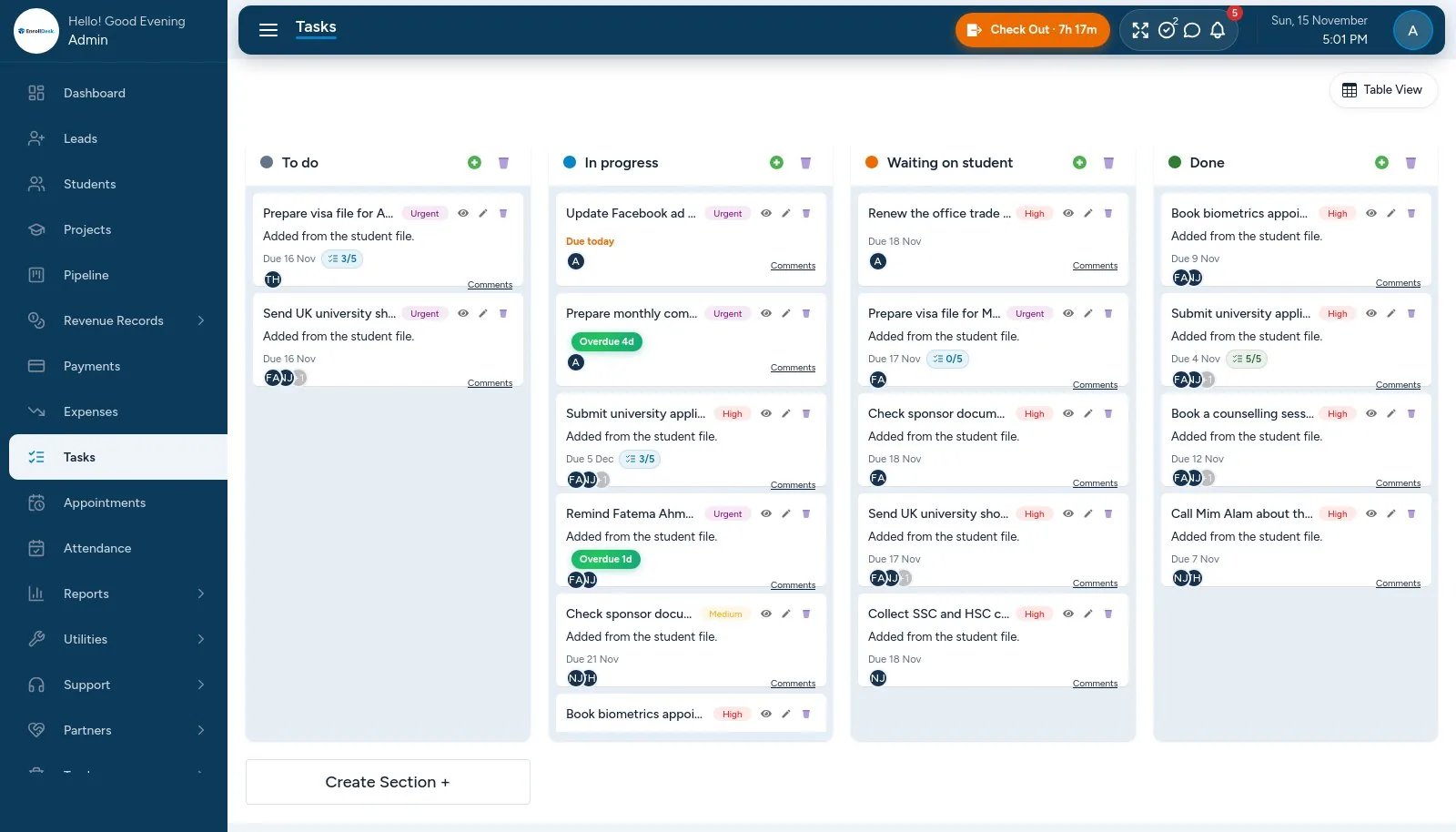
EnrollDesk task board with priorities, checklists and due dates
01

Tasks

The work behind every file.

  • Linked to a lead, student, application or invoice
  • List and Kanban board; priorities, assignees, followers, comments and files
  • Quick filters: mine, overdue, due today, this week
  • Checklists inside a task, and a personal to-do list
02

Tasks that run themselves

Less to remember.

  • Repeating tasks: daily, weekly or monthly, until a date
  • Task templates: apply a whole set of steps to a lead or application
  • Priority raised automatically as the due date gets close
  • Due and overdue tasks in each person's morning summary
03

Appointments and online meetings

Counselling sessions booked by staff or students.

  • Free slots from each counsellor's weekly hours, skipping holidays, leave and booked times
  • In office, by phone or online: Google Meet links created automatically, Jitsi as a fallback, or your own link
  • Calendar by week or by counsellor; reschedule, cancel, no-show and outcome notes
  • Reminders: counsellors in the morning, students the day before
04

Attendance

Hours worked, without spreadsheets.

  • Check-in and check-out; a month calendar for each person
  • Late, overtime and hours due from shifts, with a company-wide late grace
  • Missed check-out corrections approved by a manager; every edit recorded
  • Weekends per person, holidays that repeat each year, and an attendance report
05

Leave

Requests, approvals and balances.

  • Leave types with yearly days, and allowances per person
  • Full or half days, with the day count worked out for you
  • Approve, reject or cancel
  • Approved leave shows in attendance and blocks appointment slots
06

Team and announcements

Everyone on the same page.

  • Staff profiles with department, designation and shift
  • Announcements with priority; urgent ones must be acknowledged
  • Who has read each announcement
  • Active sessions per person, with sign-out of other devices